
Step #1:"It appears likely that there are about ten times as many artists in the U.S. today as there were in 1950 while the population of the country as a whole has only doubled. Are Americans five times as talented as they were in 1950? Or does this increase in quantity merely reflect demand, and correspond to a dilution in quality?"
-Piri Halasz, The New York Art World (July/August 2005)
Open Adobe Photoshop and create a new file. (My example below is 120 dpi; 4 x 4 inches.) Insert a few randomly chosen blocks of color. It doesn't matter how you place these blocks or the colors that you choose. You can even use a brightly colored photograph or, better yet, an anime still.

Step #2:
Using the Wave command (found under the Filter/Distort drop-down menu), make the following selections:
Type: Sine
Generators: 6
Wavelength: 230 - 575
Amplitude: 220 - 490
Horiz: 70%
Vert: 30%
Click "OK."
The results will look something like this:

Step #3:
Again use the Wave command, but play with the setting as you see fit this time. Don't be afraid to use the "Randomize" button to preview possible results.

Step #4:
Repeat Step #3 until you are satisfied with what you see on the screen. If you want to add the illusion of depth, you might create more layers, but remember to be careless about any and all editing you do. Just point-and-click until something strikes your fancy.
Before you know it, you will have produced a study for a Shirley Kaneda painting.
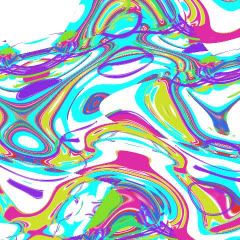
Step #5:
Congratulate yourself and then compare your mini masterpiece to an original Shirley Kaneda (see below).
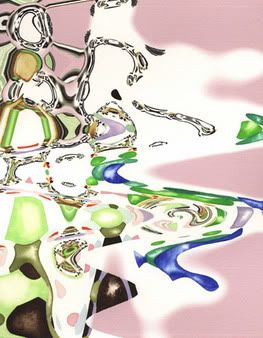
"Untitled #5"
2003
Mixed media on watercolor paper
16 x 12 inches
Granted, Kaneda's watercolor is more subtly colored and dynamic than my toss-off exercise, but you get the idea. A painting by Shirley Kaneda is, for the most part, produced by using one Photoshop filter repeatedly!
I'm not pulling back any curtains in this post. In her recent artist statements, Kaneda makes clear her indebtedness to Photoshop. She asserts that her work "investigates the relationships between the 'photographic' and the painted or between the unique and the reproducible, as well as how new technologies might be employed to supplement traditional form."
I'm no proponent of modernism, with it's misplaced faith in forward progress, the original or the new, but Kaneda's statement would suggest that her questions are more successfully limned by James Rosenquist and Marcel Duchamp, among many others. By all means, take an existing concept/genre and mine it again, in your own fashion, but please do so thoughtfully. Making a boring, if colorful "drawing" in Photoshop and painting directly from the print? That's a shallow excavation, Ms. Kaneda, and I can't help but think you're capable of better.
Lest readers think I'm being a cranky doctrinaire, slavishly championing handicraft over content and aesthetic delight, I should explain myself. I wince when I spot obvious Photoshop techniques used in contemporary painting because I have relied on some of the same tricks in the past. In graduate school, I produced a number of abstract watercolors and digital prints using exactly the same process Kaneda does. I also created many studies - and a few paintings - that resemble David Salle's new "vortex" series (see image below).
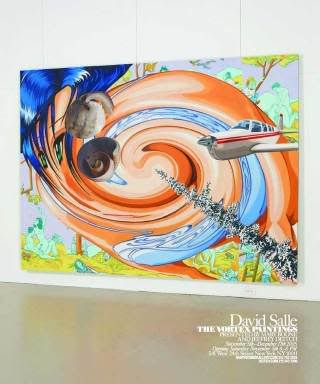
So what's up with established artists turning to Photoshop to generate bad paintings? Young, searching artists commonly experiment with digital filters but they usually outgrow these tools. The filters themselves are created by a team of talented designers, engineers and programmers deserving of kudos, but when abused by painters, the same filters become crutches.
Photo credit: Hungry Hyaena, Feigen Contemporary, Hustler of Culture
